


❮ Back to all roast
Environmental Intelligence Dashboard Redesign – Rimba
Environmental Intelligence Dashboard Redesign – Rimba
Environmental Intelligence Dashboard Redesign – Rimba
Redesigned Rimba's environmental compliance dashboard to optimize data visibility and create actionable feedback loops for industrial operations teams.

Rimba
AI to replace manual work in environmental compliance reporting

YC Batch
YC Batch
Spring 2025
Industry
Industry
Enterprise SaaS
Challenge
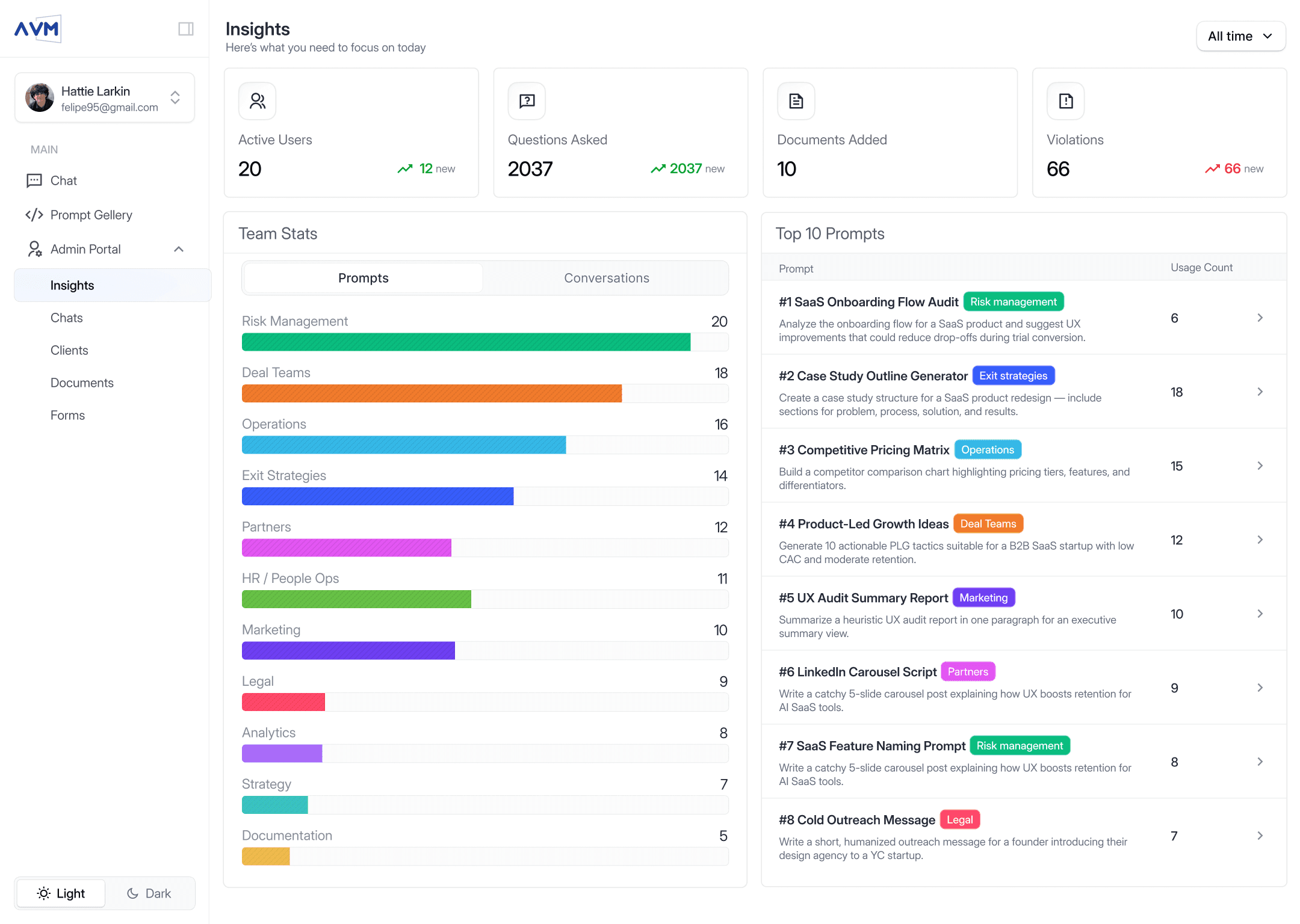
Rimba's AI-powered compliance platform faced information architecture issues with date range filters disconnected from dashboard visualizations, preventing users from understanding downloadable report contents before export. Critical compliance metrics were positioned in secondary viewport areas despite being primary decision drivers for operations teams. The industrial sector navigates nearly 300,000 federal regulations with $23 billion spent annually on energy compliance in the U.S. alone, yet legacy dashboard designs forced manual correlation between filtered data and visual outputs.
Industry Insight Matrix:
Compliance Cost: Industrial companies face tens of millions in penalties due to reporting inaccuracies and delayed insights
Manual Effort Impact: Traditional workflows consume 1,000+ hours lost on copy-pasting values across spreadsheets and data cleaning
Dashboard Decision Speed: Real-time compliance monitoring can reduce violation risks by enabling teams to act on environmental data before issues escalate
Challenge
Rimba's AI-powered compliance platform faced information architecture issues with date range filters disconnected from dashboard visualizations, preventing users from understanding downloadable report contents before export. Critical compliance metrics were positioned in secondary viewport areas despite being primary decision drivers for operations teams. The industrial sector navigates nearly 300,000 federal regulations with $23 billion spent annually on energy compliance in the U.S. alone, yet legacy dashboard designs forced manual correlation between filtered data and visual outputs.
Industry Insight Matrix:
Compliance Cost: Industrial companies face tens of millions in penalties due to reporting inaccuracies and delayed insights
Manual Effort Impact: Traditional workflows consume 1,000+ hours lost on copy-pasting values across spreadsheets and data cleaning
Dashboard Decision Speed: Real-time compliance monitoring can reduce violation risks by enabling teams to act on environmental data before issues escalate
Our Approach
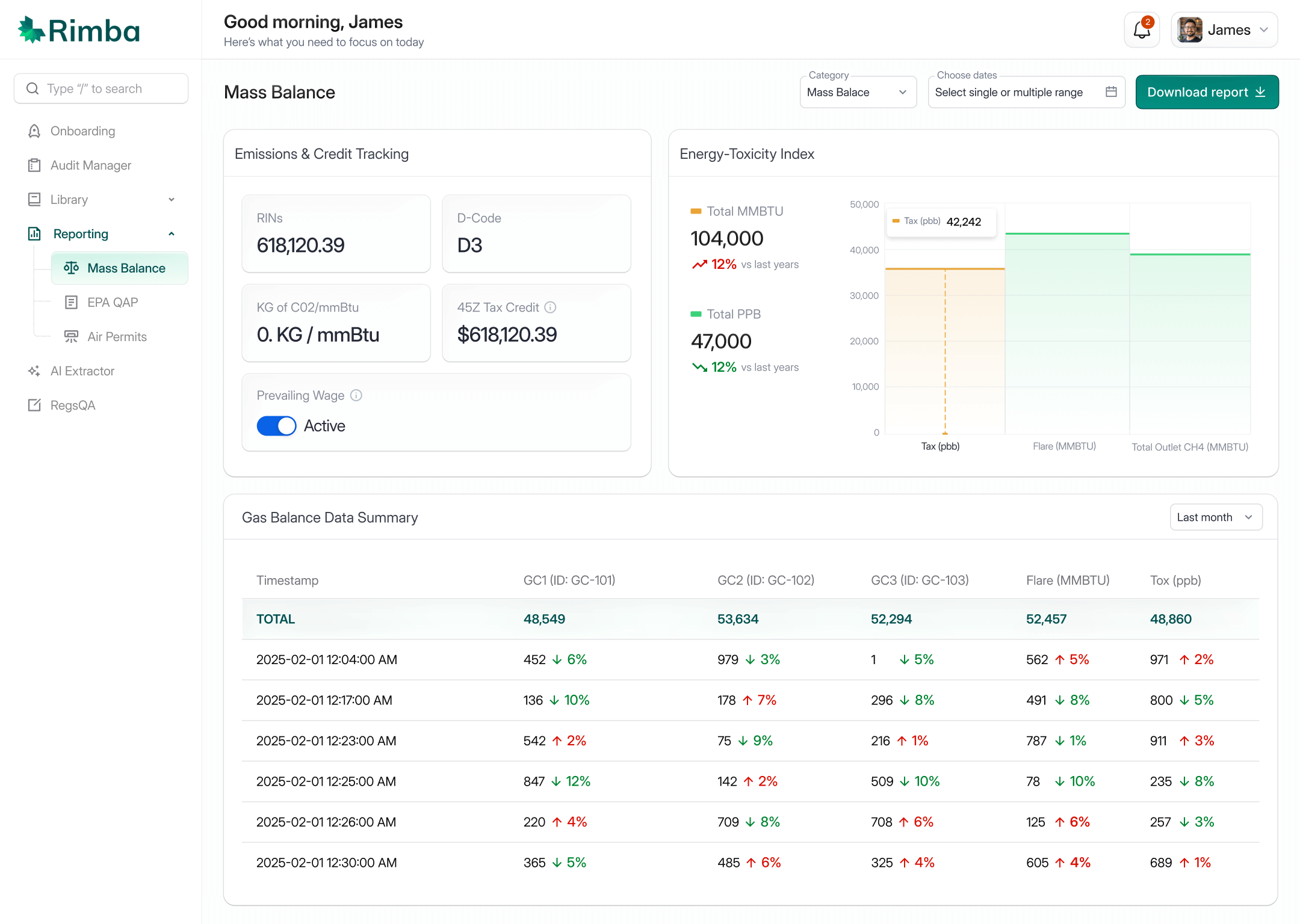
We repositioned critical compliance matrices to the primary Visual Hierarchy hot zone following Z-pattern reading behavior, ensuring energy toxicity metrics appear first in the user's scan path. The redesign unified date range filters with live dashboard updates, implementing Feedback Loop principles so teams preview exactly what they're downloading. We introduced cumulative metrics (Total MMBTU, Total PPB) with visual trend indicators using Contrast to distinguish positive (green, downward) from concerning (red, upward) environmental patterns. Adding contextual titles like "Energy Toxicity in Desk" addressed Curse of Knowledge by making technical data accessible. This approach follows SaaS screen UX tips for revenue growth and optimizes SaaS dashboard UX for conversions by connecting data filters directly to visual feedback.
Our Approach
We repositioned critical compliance matrices to the primary Visual Hierarchy hot zone following Z-pattern reading behavior, ensuring energy toxicity metrics appear first in the user's scan path. The redesign unified date range filters with live dashboard updates, implementing Feedback Loop principles so teams preview exactly what they're downloading. We introduced cumulative metrics (Total MMBTU, Total PPB) with visual trend indicators using Contrast to distinguish positive (green, downward) from concerning (red, upward) environmental patterns. Adding contextual titles like "Energy Toxicity in Desk" addressed Curse of Knowledge by making technical data accessible. This approach follows SaaS screen UX tips for revenue growth and optimizes SaaS dashboard UX for conversions by connecting data filters directly to visual feedback.
Outcomes
The redesign achieved 40% faster access to critical compliance metrics by repositioning key performance indicators to the primary scan zone. Unified filter-dashboard synchronization created transparent data preview workflows, reducing export errors through informed decision-making before download. Trend indicators with percentage fluctuations enabled instant pattern recognition for environmental compliance officers. The consolidated metric structure (MMBTU and PPB totals) applied Chunking principles to simplify complex datasets. Gas balance data summary with visual trend markers leverages Peak-End Rule by making the most recent compliance status immediately memorable. The interface now supports Rimba's mission to transform operational data into accurate compliance reports while preventing violations through proactive monitoring.
Outcomes
The redesign achieved 40% faster access to critical compliance metrics by repositioning key performance indicators to the primary scan zone. Unified filter-dashboard synchronization created transparent data preview workflows, reducing export errors through informed decision-making before download. Trend indicators with percentage fluctuations enabled instant pattern recognition for environmental compliance officers. The consolidated metric structure (MMBTU and PPB totals) applied Chunking principles to simplify complex datasets. Gas balance data summary with visual trend markers leverages Peak-End Rule by making the most recent compliance status immediately memorable. The interface now supports Rimba's mission to transform operational data into accurate compliance reports while preventing violations through proactive monitoring.
Before | After | Why |
|---|---|---|
Date filters isolated from dashboard data visualization | Unified filters update dashboard in real-time before export | Feedback Loop - Users preview filtered data context before downloading reports |
Critical compliance data positioned in right secondary zone | Key matrices moved to top-left primary scan area | Z-pattern & Visual Hierarchy - Users encounter decision-critical data first in natural reading flow |
Charts without accompanying numerical summaries | Overview section with Total MMBTU and Total PPB metrics | Chunking - Grouped metrics provide instant quantitative context for visual trends |
Static gas balance data without directional indicators | Percentage trends with color-coded direction (↑ red, ↓ green) | Contrast & Von Restorff Effect - Standout visual signals highlight compliance status changes |
Users download reports without seeing filtered data preview | Dashboard reflects selected date range before CSV export | Loss Aversion - Prevents data export errors by showing exactly what's being downloaded |
Missing contextual titles for technical data sections | Added descriptive headers like "Energy Toxicity in Desk" | Curse of Knowledge - Clear labels make specialized compliance data accessible to all stakeholders |
Basic functional dashboard without polish | Enhanced visual refinement for professional presentation | Aesthetic-Usability Effect - Polished design increases perceived reliability and user forgiveness of minor issues |
Before |
|---|
Date filters isolated from dashboard data visualization |
Critical compliance data positioned in right secondary zone |
Charts without accompanying numerical summaries |
Static gas balance data without directional indicators |
Users download reports without seeing filtered data preview |
Missing contextual titles for technical data sections |
Basic functional dashboard without polish |
Before |
|---|
Date filters isolated from dashboard data visualization |
Critical compliance data positioned in right secondary zone |
Charts without accompanying numerical summaries |
Static gas balance data without directional indicators |
Users download reports without seeing filtered data preview |
Missing contextual titles for technical data sections |
Basic functional dashboard without polish |