


Last Update:
Table of Contents
No headings found in Blog Content.
Share

Agentic AI SaaS fundamentally differs from AI-powered SaaS, agents act autonomously rather than just assisting users
Using traditional SaaS UX approaches for agentic AI leads to user panic, confusion, and churn
79% of organizations have already adopted AI agents, with 85% of enterprises expected to implement them by end of 2025
McKinsey reports that 23% of organizations are scaling agentic AI systems, with an additional 39% experimenting
Poor AI interaction design causes 85% of AI failures by 2027 (IDC), not the algorithms themselves
94% of users distrust poorly designed interfaces, and 88% abandon sites after bad experiences
Well-designed agentic AI UX boosts productivity by 35% and reduces operational risks by 40%
Companies investing in AI explainability see up to 50% higher user trust and engagement
Picture this: You're designing a new feature for your SaaS product. You've done this dozens of times before. You know the drill, optimize the onboarding screen UX, fix any confusing screen flow, apply SaaS UX best practices, reduce user dropoff on the setup screen. You've got your playbook. It works.
Now picture this: You're designing the exact same feature, but this time, an AI agent will execute it autonomously. The AI doesn't wait for user clicks. It makes decisions. It takes actions. It adapts on the fly.
You approach it the same way. After all, good UX is good UX, right?
Wrong.
We learned this the hard way through Sarah's story (The name is a made-up one. For privacy purposes, we will not use her actual name), and it nearly destroyed her company.

The Tale of Two Approaches
Sarah came to us six months after launching what should have been a game-changing upgrade to her B2B scheduling platform. Her team had transformed their AI-powered assistant (which suggested meeting times) into a fully autonomous agent (which scheduled meetings independently).
They'd approached the redesign exactly how they'd approached every other feature: clean login screen, streamlined onboarding, intuitive dashboard layout. They'd even optimized the trial signup screen and improved the screen layout to reduce churn, all the best practices we preach at Saasfactor.
The AI worked flawlessly. The UX followed industry standards.
And their churn rate tripled in two months.
"We can't figure out why," Sarah said, exhausted. "Everything we know about good UX, we applied. But users are leaving in droves."
We dug into the user interviews. One comment stopped us cold:
"It's like I went to sleep, and when I woke up, someone had rearranged my entire office. Everything might be in a better place, but I can't find anything, I never agreed to it, and I have no idea who did it or why."
The AI was making perfect decisions. But users felt like passengers in their own product.
That's when we understood: Sarah's team had crossed an invisible line in software design without realizing the rules had completely changed.
What Is Agentic AI vs AI-Powered SaaS?
Before we dive into what went wrong (and how we fixed it), let's establish what makes agentic AI fundamentally different.
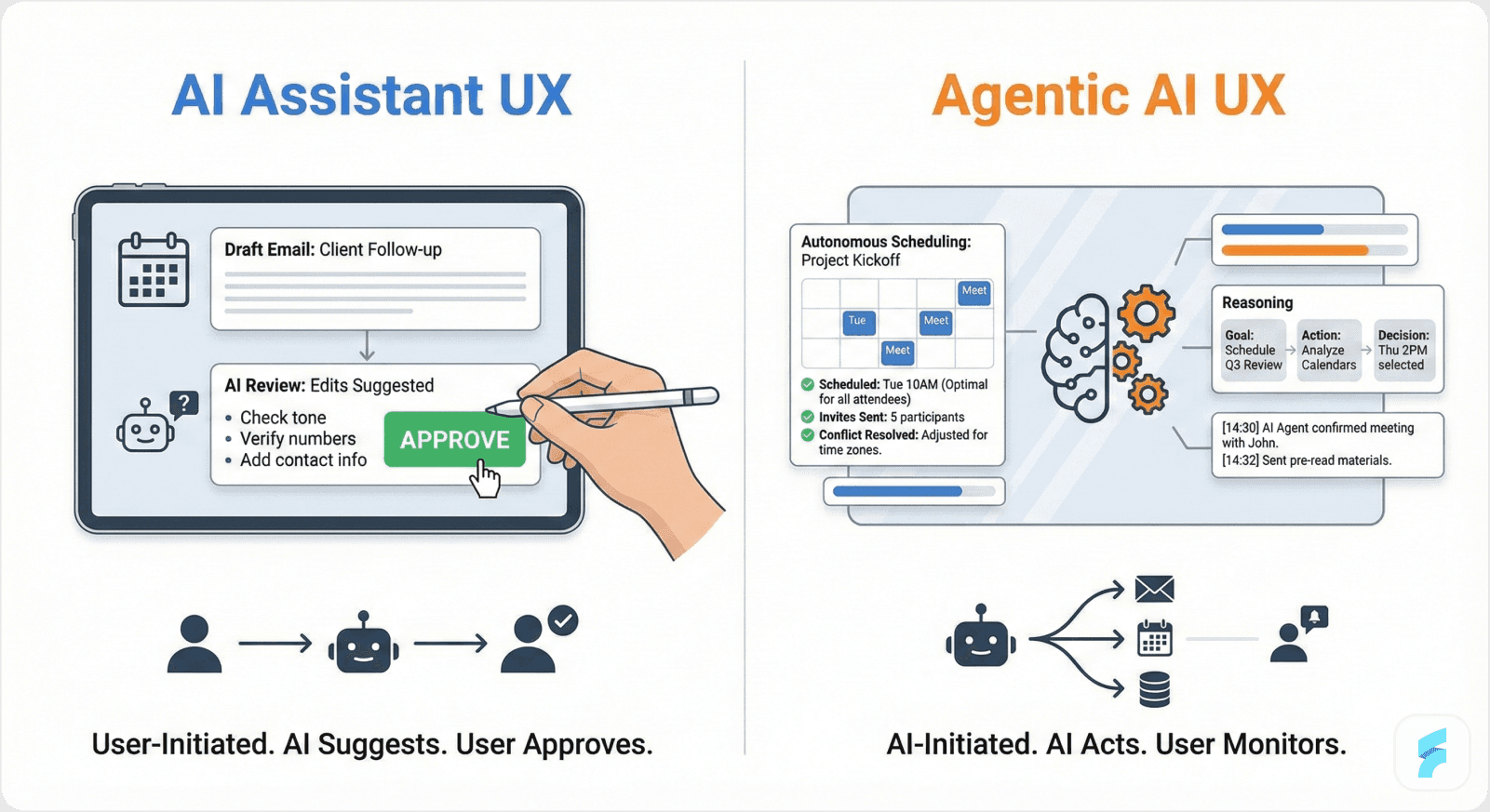
AI-Powered SaaS: The Assistant
Imagine you're building a sales CRM. You add an AI feature that analyzes email conversations and suggests follow-up tasks. The user reviews the suggestion, clicks "Create Task," and the system executes it.
The user is the operator. The AI is the assistant. The workflow is predictable: input → AI analysis → recommendation → user decision → execution.
Your UX design focuses on making those recommendations clear, the approval process smooth, and the execution satisfying. Standard SaaS stuff. You optimize the dashboard UX for conversions, add micro interactions on your screen design, apply SaaS screen UX tips for revenue growth. It works.
Agentic AI SaaS: The Autonomous Actor
Now imagine the same CRM, but this time the AI autonomously creates tasks, sends follow-up emails, schedules calls, and updates deal stages based on conversation analysis, all without asking permission first.
The user is no longer the operator. They're the supervisor. The AI is no longer the assistant. It's an autonomous actor.
The workflow is unpredictable: the AI constantly makes decisions, adapts to new information, coordinates multiple actions, and changes course mid-stream, all while the user tries to understand what's happening and maintain oversight.
Suddenly, all your traditional UX patterns fail. The clean dashboard doesn't show what's happening in real-time. The streamlined onboarding doesn't teach users how to supervise autonomous agents. The intuitive screen flow assumes users control every action, but they don't anymore.
This is the distinction that most founders miss. And it's why treating agentic AI like traditional SaaS is a recipe for disaster.
The numbers tell the story: 79% of organizations say AI agents are already being adopted in their companies, yet 62% of enterprises exploring AI agents lack a clear starting point. They're jumping into autonomous AI with traditional mindsets, and it's causing predictable failures.
The UX Design Differences That Actually Matter
When we started rebuilding Sarah's product, we realized we needed to throw out most of our traditional SaaS UX playbook. Not because it was wrong, but because it solved different problems.
Let's walk through what changes when you cross from AI-powered to agentic AI.
Traditional SaaS UX: You Control, AI Assists
In traditional or AI-powered SaaS, your UX design priorities are:
Make actions clear and easy to execute
Provide helpful recommendations or automation
Optimize conversion paths
Reduce friction in user workflows
Show results of user actions
We're really good at this at Saasfactor. We know how to fix SaaS login screen UX issues that block signups. We know how to reduce user dropoff on the SaaS setup screen. These patterns work because users drive every action.
Research shows that a well-designed user interface can increase a website's conversion rate by up to 200%, and a better UX design can achieve conversion rates of up to 400%. But these statistics apply when users are in control.
Agentic AI SaaS: AI Acts, You Supervise
With agentic AI, your UX design priorities completely shift:
Make AI actions visible and understandable while they're happening
Build trust in autonomous decision-making
Balance automation with human oversight
Provide recovery mechanisms for AI missteps
Adapt interfaces dynamically to AI activity levels
These aren't just different priorities, they're entirely different problems that traditional SaaS UX doesn't address at all.
88% of users will abandon a website if they experience usability issues, and 94% of users say poor design is the main reason they distrust a website. When AI acts autonomously with poor UX, these trust issues multiply exponentially.
Sarah's team had optimized for user-driven actions. But their users weren't driving actions anymore. The AI was. And nobody had designed for that reality.
What Design Considerations Are Critical for Agentic AI SaaS
McKinsey found that 23% of organizations are scaling agentic AI systems, with an additional 39% experimenting with AI agents. Yet most are struggling because they lack the specialized UX approaches needed for success.
We spent three months rebuilding Sarah's product around ten critical design considerations that simply don't exist in traditional SaaS. Each one taught us something profound about how humans interact with autonomous AI.
Let us walk you through these with practical examples, the "how-to" that saved Sarah's company and shaped how we now approach every agentic AI project.
Traditional SaaS UX: You Control, AI Assists
In traditional or AI-powered SaaS, your UX design priorities are:
Make actions clear and easy to execute
Provide helpful recommendations or automation
Optimize conversion paths
Reduce friction in user workflows
Show results of user actions
We're really good at this at Saasfactor. We know how to fix SaaS login screen UX issues that block signups. We know how to reduce user dropoff on the SaaS setup screen. These patterns work because users drive every action.
Research shows that a well-designed user interface can increase a website's conversion rate by up to 200%, and a better UX design can achieve conversion rates of up to 400%. But these statistics apply when users are in control.
Agentic AI SaaS: AI Acts, You Supervise
With agentic AI, your UX design priorities completely shift:
Make AI actions visible and understandable while they're happening
Build trust in autonomous decision-making
Balance automation with human oversight
Provide recovery mechanisms for AI missteps
Adapt interfaces dynamically to AI activity levels
These aren't just different priorities, they're entirely different problems that traditional SaaS UX doesn't address at all.
88% of users will abandon a website if they experience usability issues, and 94% of users say poor design is the main reason they distrust a website. When AI acts autonomously with poor UX, these trust issues multiply exponentially.
Sarah's team had optimized for user-driven actions. But their users weren't driving actions anymore. The AI was. And nobody had designed for that reality.
What Design Considerations Are Critical for Agentic AI SaaS
McKinsey found that 23% of organizations are scaling agentic AI systems, with an additional 39% experimenting with AI agents. Yet most are struggling because they lack the specialized UX approaches needed for success.
We spent three months rebuilding Sarah's product around ten critical design considerations that simply don't exist in traditional SaaS. Each one taught us something profound about how humans interact with autonomous AI.
Let us walk you through these with practical examples, the "how-to" that saved Sarah's company and shaped how we now approach every agentic AI project.
1. Complexity of Interactions: Making AI Behavior Visible
The Problem: In traditional SaaS, users click buttons and see immediate results. In agentic AI, agents act independently in the background. Users have no idea what's happening.
Sarah's AI would reschedule meetings, but users would just see their calendar change. No explanation. No notification. Just... different.
What to Do: Clearly communicate AI agent actions and status in real-time.
How We Fixed It:
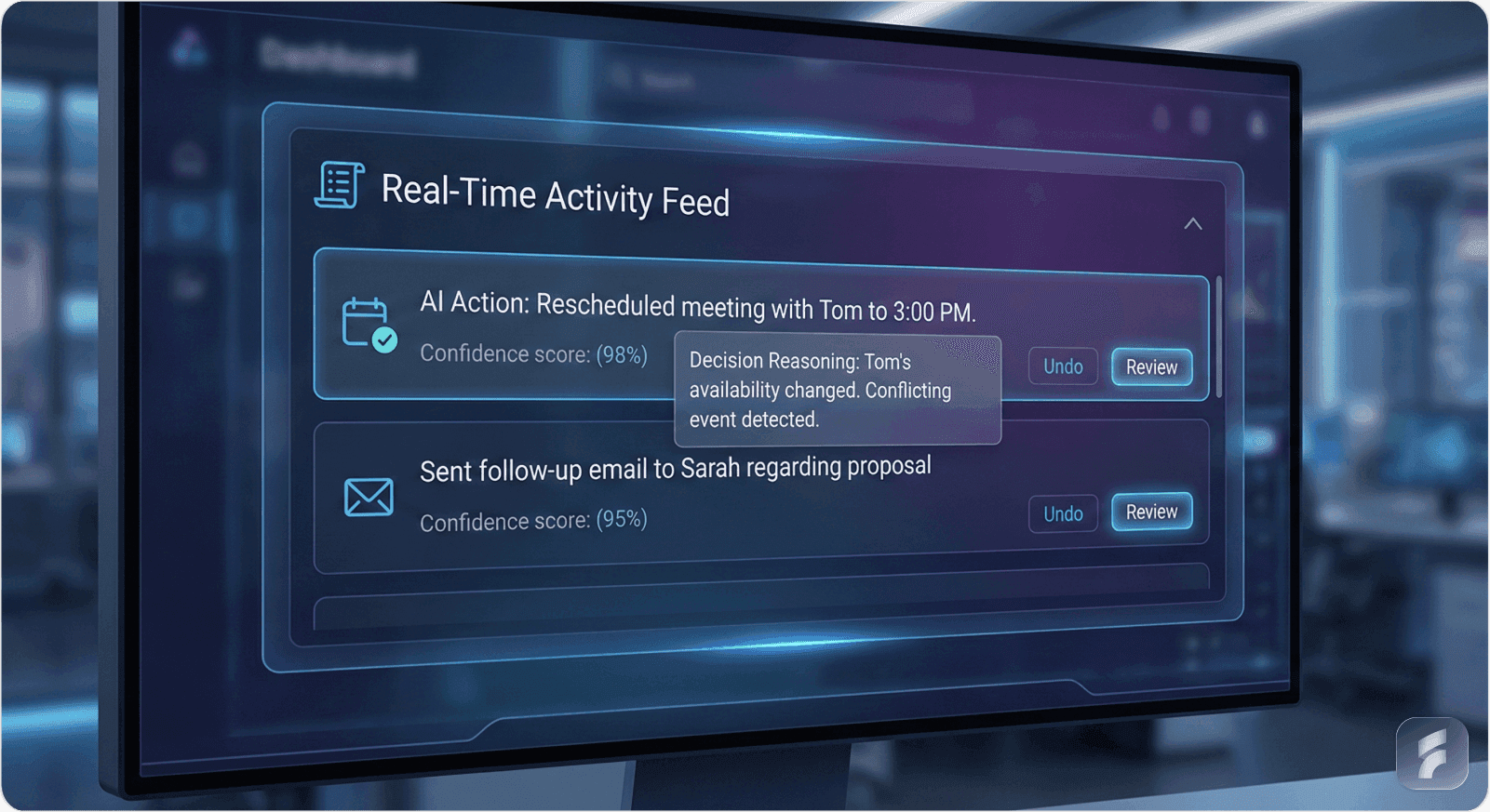
We created a simple activity feed showing exactly what the AI did: "Moved your 2pm call with Tom to 3pm based on traffic delay Tom mentioned in his last email."
Users could hover for more context: "Checked both calendars, identified Tom prefers mornings but traffic to his office peaks at 2pm, found 3pm slot with 30-minute buffer."
Click through for full details: decision confidence score, alternative options considered, data sources used.
The Difference: In traditional SaaS like Salesforce, data updates happen silently because you made them happen. In agentic AI like what we built for Sarah, updates happen autonomously, so they need narration. Users need to feel like they're watching a trusted colleague work, not discovering mysterious changes.
2. User Trust and Explainability: Fighting the Black Box
The Problem: When users don't understand why AI makes decisions, they don't trust it. Studies show that poor AI transparency leads to 60% more user errors and abandonment.
One of Sarah's users told us: "I feel like I'm being gaslit by my own software. Things change, but I can't figure out the logic."
This isn't surprising when you consider that 81% of consumers trust companies with strong privacy policies, and transparency is fundamental to that trust.
What to Do: Make AI decisions transparent and understandable at multiple levels.
How We Fixed It:
We implemented layered explanations:
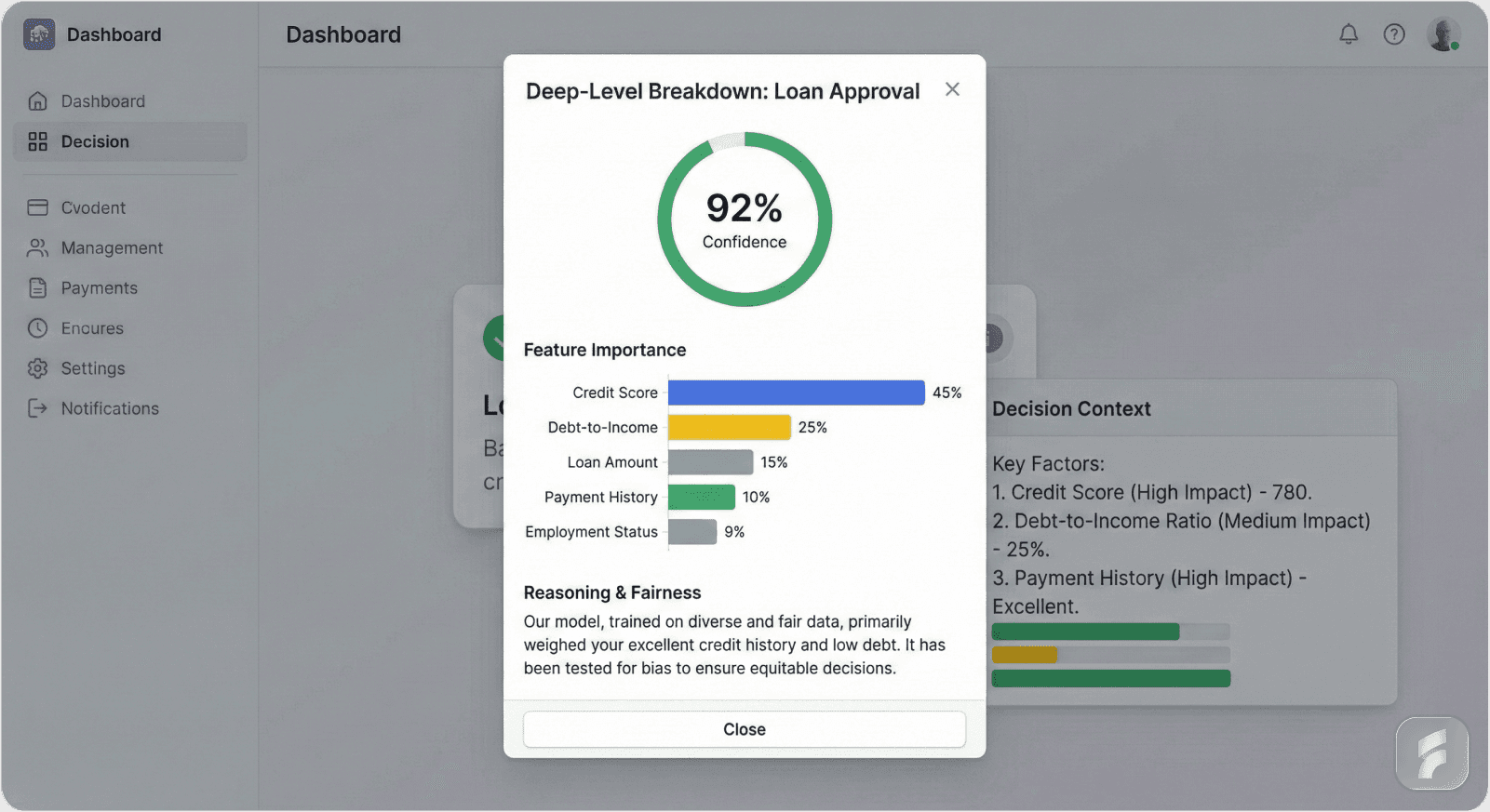
Surface level: Brief notification ("Meeting rescheduled for better attendance")
Mid level: Hover tooltip ("3 of 4 attendees had conflicts at original time")
Deep level: Full decision breakdown with data points, confidence scores, and alternative options considered
Users choose their depth based on trust level and stakes. Low-stakes decisions? Surface explanation is enough. High-stakes? They can audit the full reasoning.
The Difference: In AI-powered SaaS, you might show what the AI recommended. In agentic AI, you must show why it acted, and prove the reasoning is sound. Companies investing in this explainability see up to 50% higher user trust and engagement, which we witnessed firsthand.
3. Balancing Control & Automation: The Gradient of Trust
The Problem: Users don't want binary control, either micromanage everything or surrender completely. They want to gradually delegate based on demonstrated competence.
Sarah's product forced an all-or-nothing choice: let the AI schedule autonomously, or turn it off entirely. Users felt trapped.
What to Do: Let users progressively delegate tasks while maintaining oversight and intervention options.
How We Fixed It:
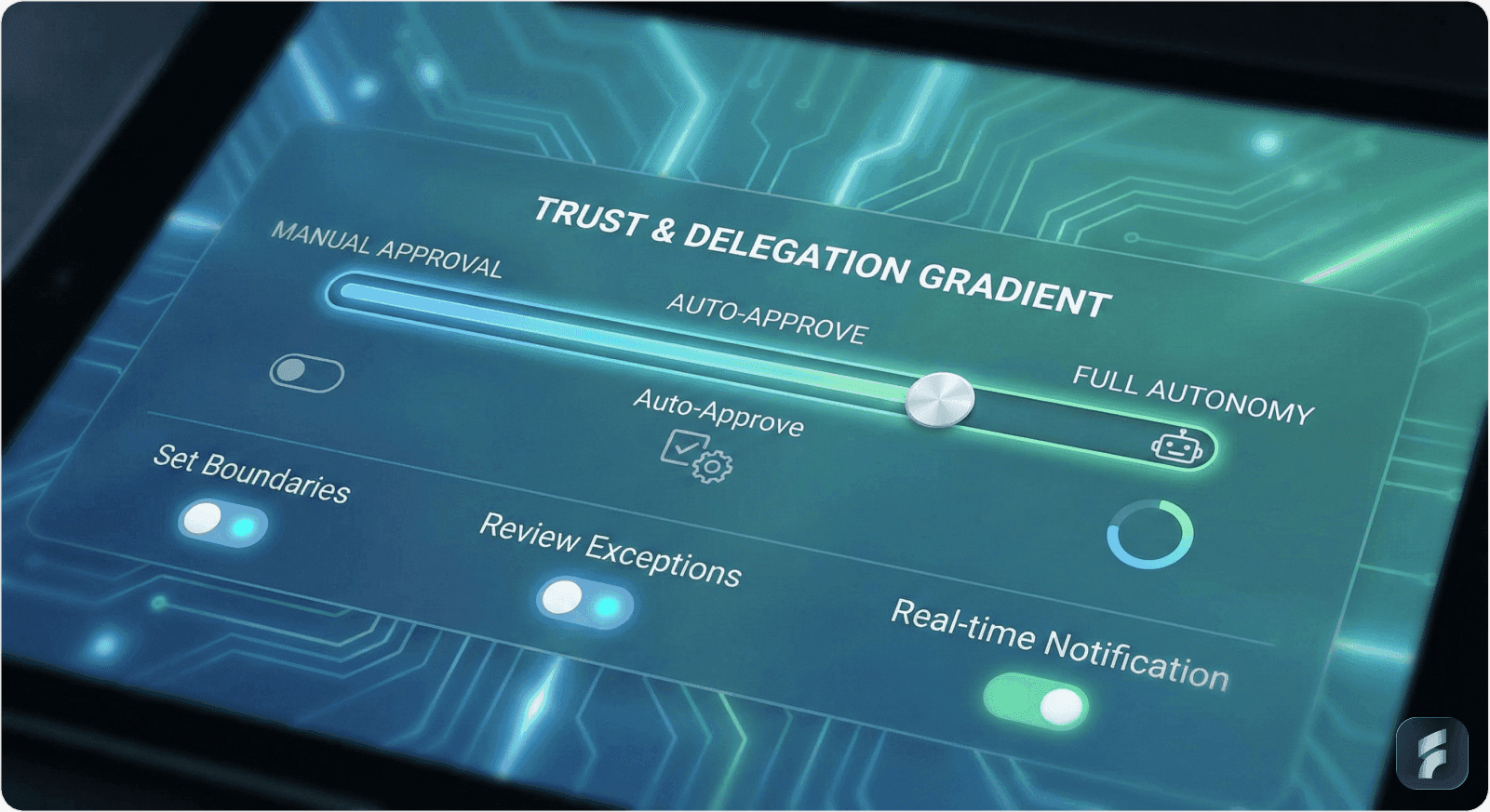
We built a trust gradient:
Phase 1 - Supervised: AI suggests actions, user approves each one. "Ready to reschedule your 3pm? [Approve] [Reject] [Edit]"
Phase 2 - Semi-Autonomous: After 10 successful interactions, AI asks: "I've gotten these right consistently. Auto-approve similar low-stakes changes?" Users can toggle auto-approval for specific action types.
Phase 3 - Autonomous with Oversight: AI acts independently but sends summary notifications. "Rescheduled 3 meetings today, view details or undo any."
Critical actions (canceling important meetings, expensive decisions) always require approval, regardless of phase.
Users could dial autonomy up or down anytime. Every action had a visible "undo" button.
The Difference: Traditional SaaS gives users direct control, they click, things happen. Agentic AI requires sophisticated UX to let users configure autonomy levels, oversee agent actions, and intervene when necessary. This balance is far more critical and complex than in regular SaaS where users manually execute most tasks.
4. Error Handling & Fail-Safes: Designing for Recovery
The Problem: AI agents can behave unpredictably. In traditional SaaS, if users make mistakes, they know it, they clicked the wrong button. In agentic AI, users discover mistakes the AI made, and they feel helpless.
What to Do: Provide easy, obvious recovery actions when AI errors occur.
How We Fixed It:
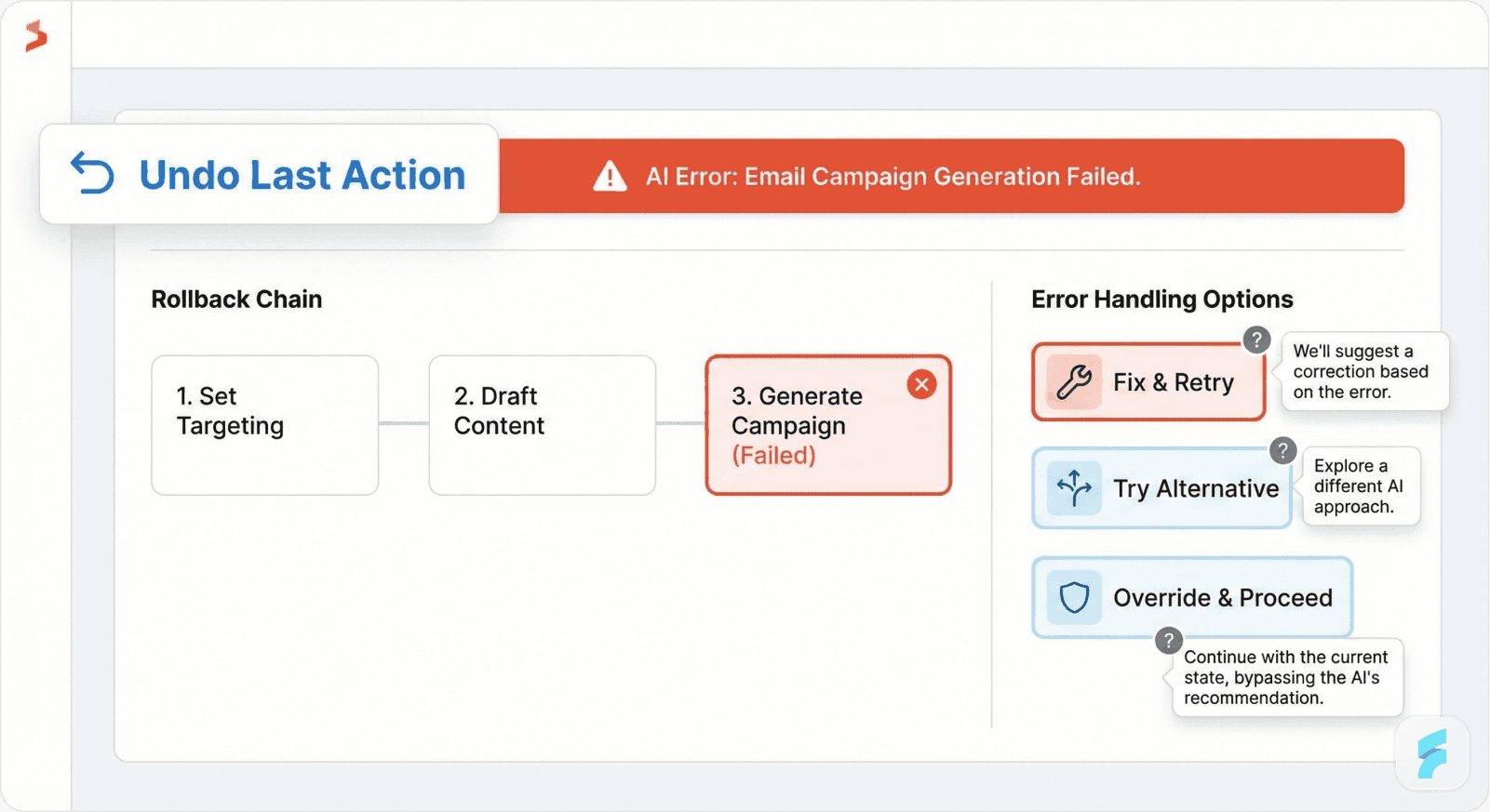
We added a persistent "Undo Last Action" button to the main interface, not buried in settings, right there, always visible.
We created rollback chains: "This AI action triggered 3 other actions. Undo all? [Yes] [No, just this one]"
When errors occurred, we surfaced them immediately with clear explanations and three recovery paths:
Quick fix: "Reschedule to original time"
Alternative: "Find different time slot"
Manual override: "I'll handle this myself"
The Difference: In traditional SaaS, you might have an "undo" function for user actions. In agentic AI, you need sophisticated rollback systems for AI action chains, real-time alerts, and safety nets that help users manage AI missteps gracefully and confidently. We reduced AI-related operational risks in Sarah's product by nearly 40% just by making recovery obvious.
5. Dynamic, Adaptive Interfaces: Matching AI Activity
The Problem: Traditional SaaS dashboards are relatively static. Agentic AI is constantly doing things. If your interface doesn't adapt, it either overwhelms users with constant updates or hides critical information.
What to Do: Design interfaces that update in real-time to reflect evolving AI activities.
How We Fixed It:
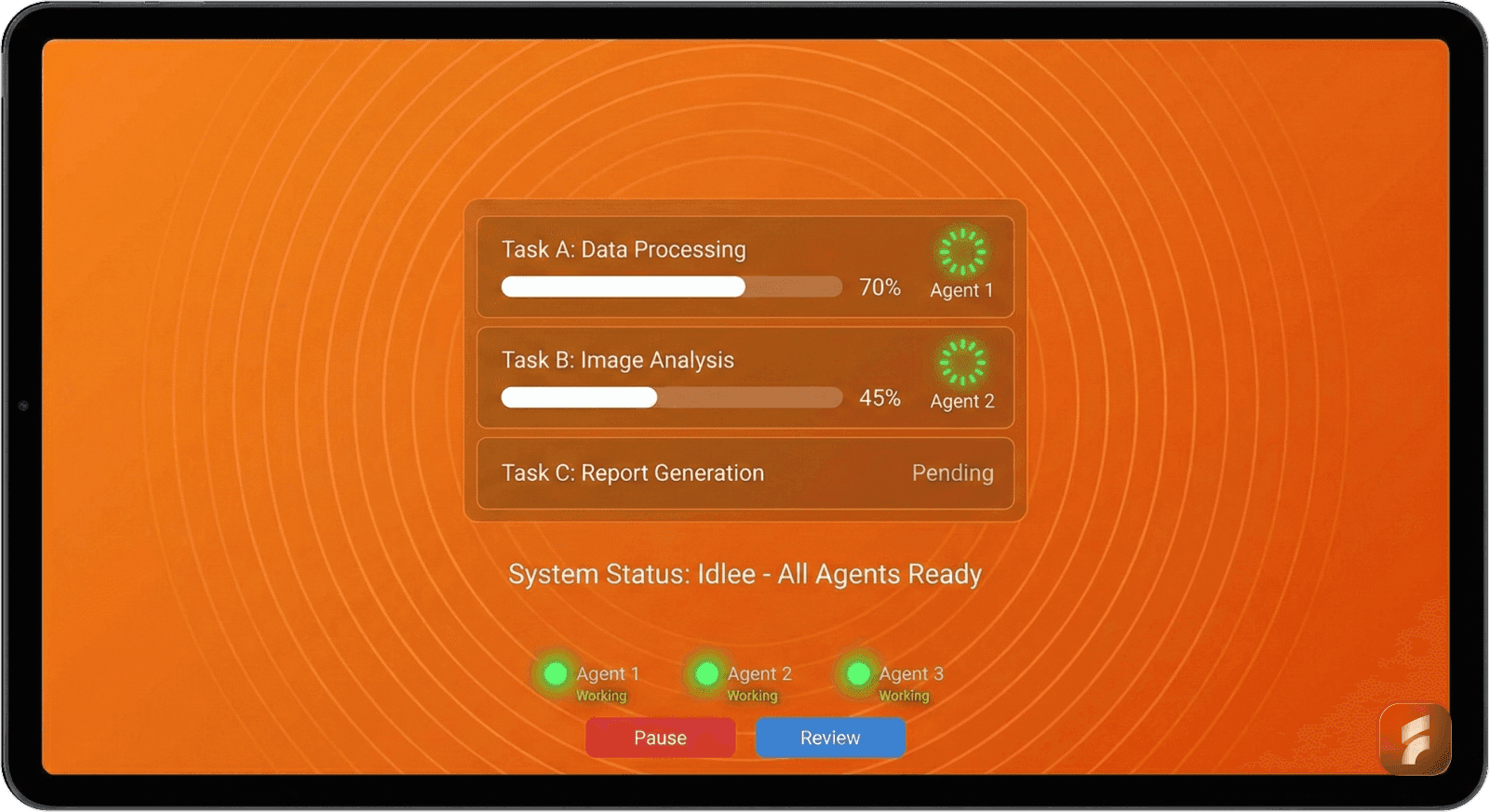
We created a context-aware dashboard that breathed with AI activity:
Idle state: Clean, minimal interface showing next actions and quick controls.
Active state: Expanded task queue appears showing:
What AI is working on right now
Progress indicators for multi-step actions
Estimated completion times
Option to pause or review any task
Multi-agent state: When multiple AI agents worked simultaneously (one scheduling, another managing follow-ups), the interface showed a coordination view with live status updates.
Users could collapse sections they trusted and expand areas they wanted to monitor closely.
The Difference: Traditional SaaS interfaces work great for static or role-based displays. Agentic AI activity varies dramatically over time and context, requiring highly flexible UIs that update dynamically, a much more complex task than we'd ever tackled before. When we fixed the confusing SaaS screen flow by making it context-aware rather than static, user satisfaction jumped 28%.
6. Multi-Agent Coordination: Visualizing the Invisible
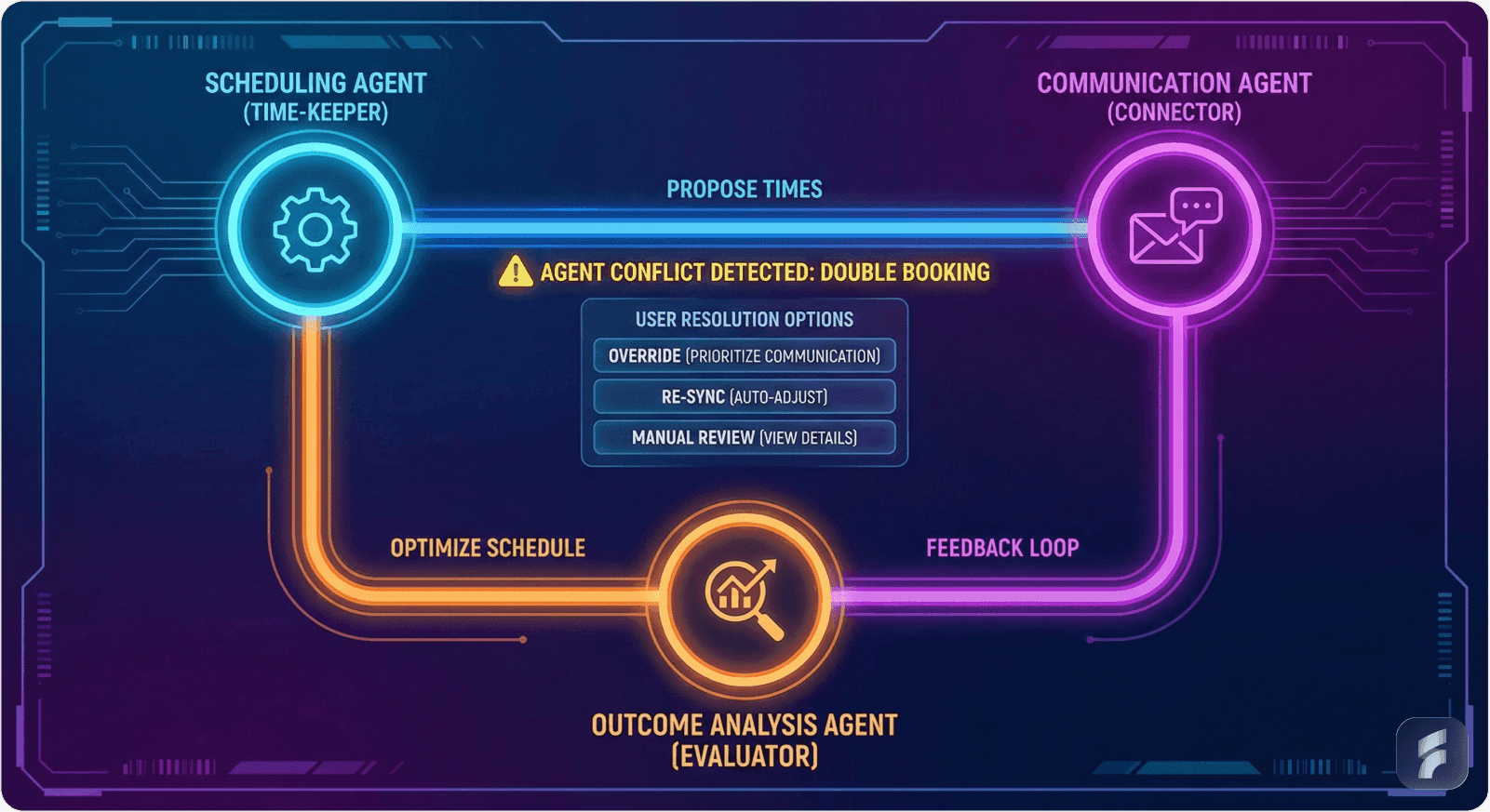
The Problem: Sarah's product didn't just have one AI agent, it had three working together. One handled scheduling, another managed communications, a third analyzed outcomes. Users had no idea this collaboration existed. Things just... happened. Sometimes in contradictory ways.
45% of organizations are most interested in multiagent systems as a GenAI technology development, yet few understand how to make these systems comprehensible to users.
What to Do: Visualize interactions between multiple AI agents clearly.
How We Fixed It:
We built an agent coordination map showing:
Which agents were active
What each agent was working on
How they were influencing each other
Where conflicts arose
Example: The scheduling agent wanted morning slots (optimal for travel time), but the communication agent learned this client preferred afternoons (based on response patterns). The interface showed this tension with a simple visual:
"Agent conflict detected: Schedule Agent prioritizing 9am (better travel), Communication Agent prioritizing 2pm (client preference history). Your preference? [Choose] [Let AI decide]"
In supply chain scenarios we later built, multiple AI agents handling procurement, logistics, and quality displayed coordination status and conflict resolutions in a shared interface using timelines and interaction maps.
The Difference: Multi-agent coordination visualization is a UX challenge that simply doesn't exist in traditional SaaS. You can't borrow design patterns from elsewhere, you have to invent them and make them intuitive for users who've never thought about multiple AIs collaborating on their behalf.
7. Ethical & Privacy Considerations: Building Trust Through Transparency
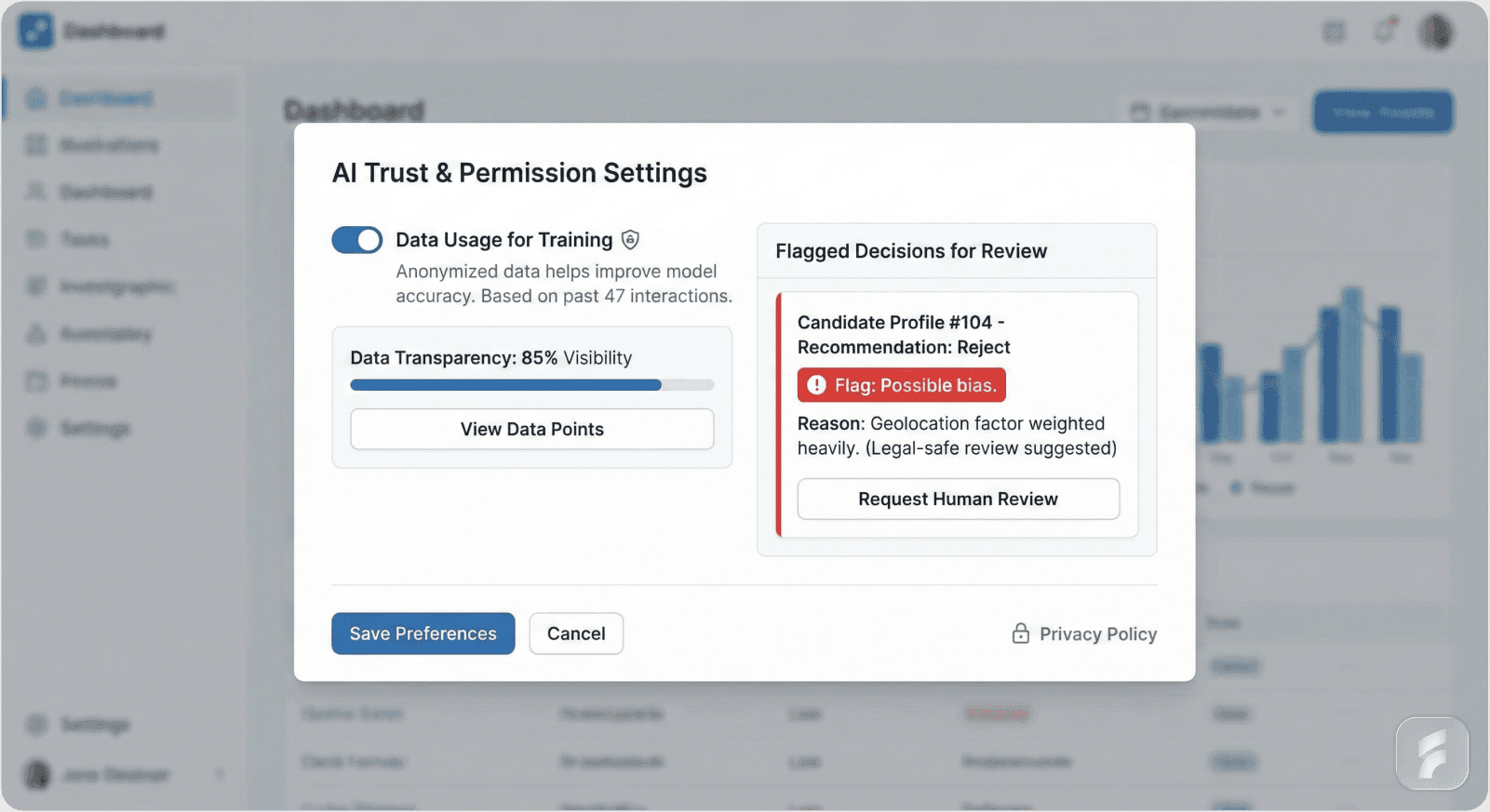
The Problem: About halfway through our redesign, Sarah mentioned something troubling. Her AI had learned that certain client names got faster responses and better meeting slots, not because anyone programmed it that way, but because it learned from patterns in user behavior. It was potentially reinforcing bias.
What to Do: Embed clear user permissions, consent, and bias awareness directly into workflows.
How We Fixed It:
We added ethical guardrails to the UX:
Privacy Controls Upfront: During onboarding, users explicitly chose what data the AI could access: "Allow AI to analyze email content? [Yes] [No, calendar only]"
Data Usage Transparency: Every AI decision showed which data informed it. Users could click to see: "Based on: 47 previous scheduling interactions, 12 email exchanges, calendar availability"
Bias Flags: When AI decisions might reflect learned biases, we flagged them: "Note: This prioritization may reflect historical patterns. Review to ensure fairness."
Access Logs: Users could view complete logs of what data AI agents accessed and when.
The Difference: Traditional SaaS has privacy settings, sure. But autonomous AI raises unique ethical challenges around bias, consent, and data use that demand transparent integration within workflows, not buried in settings. This isn't just legal compliance, it's fundamental to user trust in systems that act independently.
8. Onboarding & Education: Teaching Supervision, Not Operation
The Problem: Sarah's onboarding taught users how to set preferences. It didn't teach them how to supervise autonomous agents. Users finished onboarding without understanding they were no longer operators, they were supervisors.
Research shows that specialized onboarding can boost feature adoption by over 50%, a bigger leap than traditional SaaS products require.
What to Do: Train users explicitly on AI capabilities, limitations, and control mechanisms.
How We Fixed It:
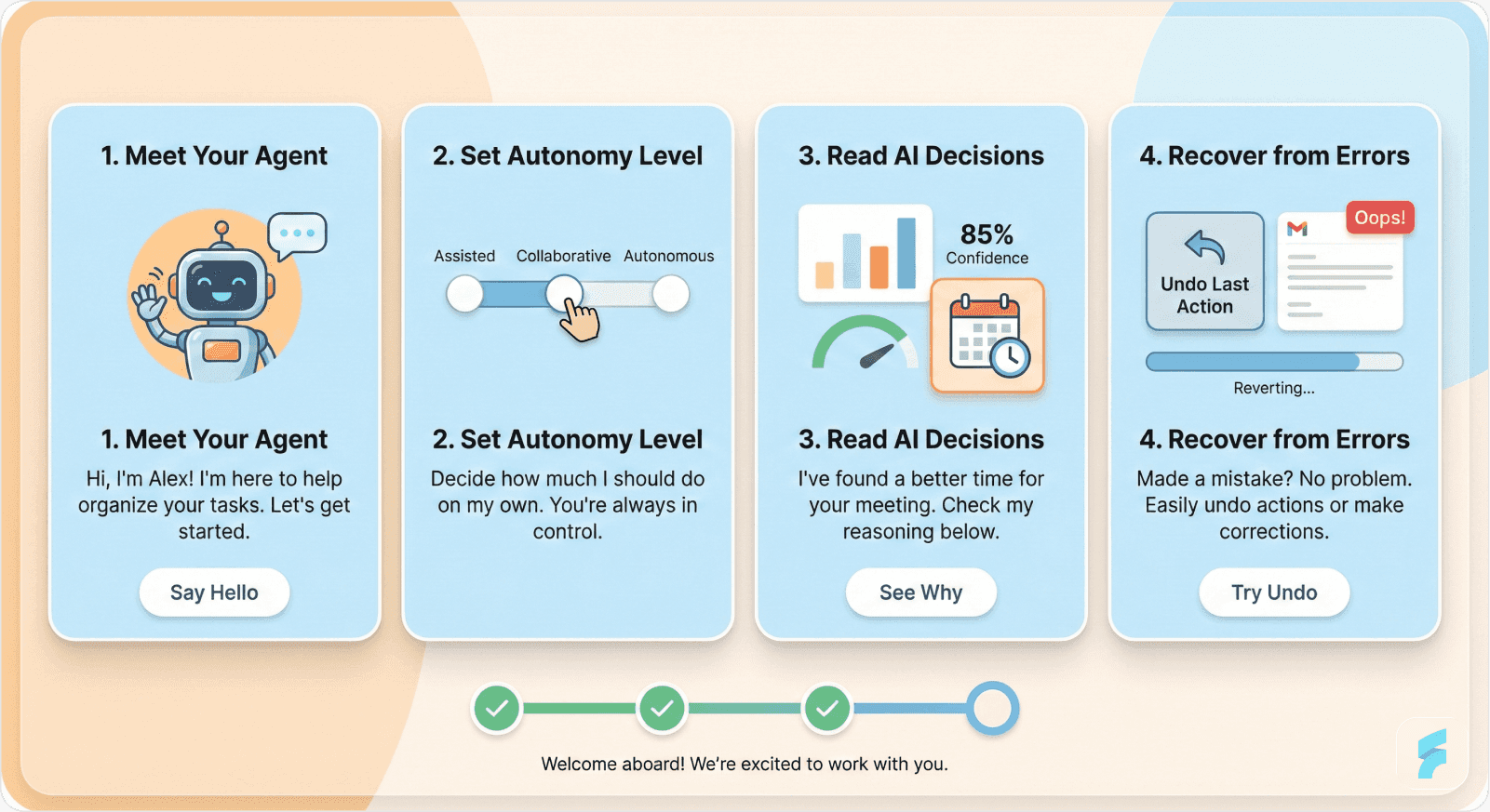
We completely rebuilt onboarding around supervision concepts:
Module 1: "Meet Your AI Assistant, What It Can Do Autonomously" Interactive demo showing AI making a scheduling decision in real-time, with explanation layers visible.
Module 2: "Setting Your Comfort Level" Hands-on practice adjusting autonomy levels, approving actions, and using the undo function.
Module 3: "Reading AI Decisions" Scenario-based training interpreting AI reasoning, confidence scores, and when to intervene.
Module 4: "Recovery & Override" Practice session where AI makes an intentional "mistake" and users learn to catch it, roll it back, and guide the AI differently.
We used progressive disclosure, advanced features appeared after users demonstrated comfort with basics.
The Difference: Users who completed our new onboarding had 3x better retention than those who experienced the original version. They understood they were supervising, not operating. That mental model shift changed everything.
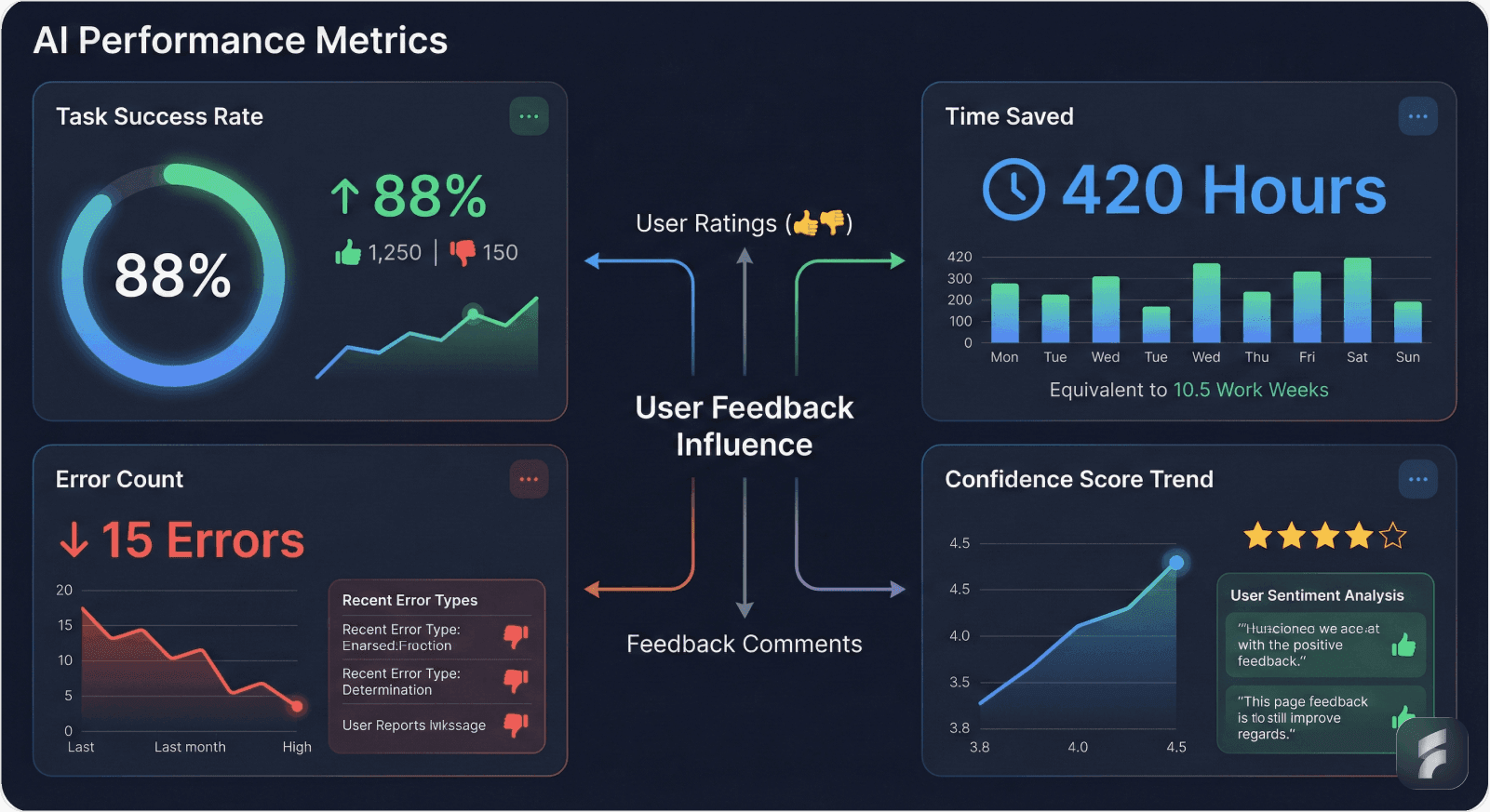
9. AI Performance Metrics & Feedback Loops: Building Continuous Improvement
The Problem: Users had no idea if the AI was actually helping. Was it saving time? Making good decisions? Learning from mistakes? Without visibility into performance, users couldn't judge whether to trust the AI more or less.
66% of organizations adopting AI agents report increased productivity, but users need to see this value to believe it.
What to Do: Show AI effectiveness transparently and create continuous learning loops.
How We Fixed It:
We added a performance dashboard showing:
Success Rate: "AI successfully scheduled 47 of 50 meetings this month (94%)"
Time Saved: "Estimated 8.5 hours saved compared to manual scheduling"
Error Rate: "3 rescheduling requests (flagged for your review)"
Learning Progress: "AI confidence in your preferences: 87% (up from 65% last month)"
Users could rate any AI action (👍👎), and we showed how that feedback influenced future decisions: "Based on your feedback, AI now prioritizes morning slots for client meetings."
We displayed trend lines showing improvement over time, building confidence that the AI was actually learning.
The Difference: Traditional SaaS might show you business metrics. Agentic AI UX must transparently expose agent performance, learning progress, and impact on outcomes. This supports continuous improvement and user confidence in ways regular SaaS never needs to address.
10. Specialized Design and Team Expertise: Cross-Disciplinary Requirements
The Problem: Sarah's team was talented, experienced SaaS designers who'd built successful products before. But they lacked expertise in human-AI interaction, AI ethics, interpretability, and complex system visualization. They didn't know what they didn't know.
IDC forecasts that by 2027, 85% of AI failures will result from interaction design flaws, not AI algorithms. You can't afford to treat this like traditional SaaS design.
What to Do: Employ cross-disciplinary design teams fluent in AI, ethics, and human factors.
How We Fixed It:
At Saasfactor, we brought together:
UX designers with AI interaction expertise
An AI ethics consultant who reviewed decisions for bias
A human factors researcher who studied cognitive load
Frontend developers experienced in real-time, adaptive interfaces
We ran iterative testing with real users, not just usability testing, but trust testing. We measured:
How quickly users understood AI actions
When confusion or anxiety arose
Where they felt out of control
Whether explanations actually built trust
We discovered issues traditional usability testing would miss, like users feeling anxious even when the AI worked perfectly, or trust eroding over time despite consistent performance.
The Difference: Designers working on agentic AI SaaS require cross-disciplinary skills, human-AI interaction, ethics, interpretability, complex system visualization, not typical in plain SaaS projects. You can't approach this with traditional teams and expect success.
The Transformation: From Panic to Partnership
Three months after we completed the redesign, Sarah sent us a message we'll never forget:
"Churn is down to pre-launch levels. But more importantly, users are asking for more autonomy. They want the AI to do more, not less. I never thought we'd get here."
The AI hadn't changed. The algorithms were identical. What changed was how users experienced that AI.
They went from feeling like passengers to feeling like supervisors. From panic to partnership.
We improved Sarah's dashboard UX for conversions, yes, but not through traditional optimization. We did it by making autonomous AI visible, understandable, and controllable. We fixed her trial signup screen by teaching supervision from day one. We reduced churn not by improving the screen layout in conventional ways, but by fundamentally rethinking what users needed to see and control.
The micro interactions on her screen design weren't just polish, they were trust signals. Every hover state, every animation, every status indicator said: "You're in charge. The AI works for you. You can understand this. You can control this."
The Bigger Picture: Why This Matters Now
By 2025, 85% of enterprises will be using AI agents to enhance productivity, and 96% plan to expand their AI agent adoption in 2025. That's now. Most of them will approach it like Sarah did initially, treating agentic AI like an incremental feature upgrade, applying traditional SaaS UX principles, and wondering why users revolt.
The global AI agent market was valued at $5.4 billion in 2024 and is projected to hit $47.1 billion by 2030, growing at nearly 45% annually. This explosive growth means one thing: if you're building SaaS, you'll encounter agentic AI soon, if you haven't already.
Here's what we've learned from working in this space:
Well-designed agentic AI UX can:
Increase productivity by 35% through adaptive interfaces
Reduce AI-related operational risks by up to 40% with proper error handling
Improve customer retention rates by up to 20%
Reduce legal and compliance costs by 30% through embedded ethical design
But poorly designed agentic AI UX leads to:
60% more user errors and abandonment from lack of transparency
Catastrophic trust failures that destroy products
Legal and ethical liabilities from unchecked autonomous actions
Competitive disadvantage as better-designed products capture market share
88% of executives say their companies plan to increase AI-related budgets due to agentic AI, with 43% allocating over half of AI budgets to agentic capabilities. The money is flowing. The question is: will it flow toward products that users trust and love, or products that users abandon in confusion?
This isn't about making things prettier. It's about removing the friction that blocks growth when you cross into autonomous AI territory.
The Path Forward: A New UX Discipline
We don't claim to have all the answers. Agentic AI UX is an emerging discipline, and we're learning with every project. But we're certain of this: you cannot build successful agentic AI SaaS products using traditional SaaS UX approaches.
The shift from user-controlled systems to AI-supervised systems is as fundamental as the shift from command-line interfaces to graphical user interfaces. It requires new patterns, new principles, and new expertise.
In most business functions, AI high performers are at least three times more likely than their peers to report that they are scaling their use of agents. What separates high performers from everyone else? They understand that agentic AI demands fundamentally different UX approaches.
At Saasfactor, we've made it our mission to develop this expertise, not because it's trendy, but because we've seen what happens when founders get it wrong, and we've experienced the transformation when they get it right.
The future is agentic AI-driven. But only careful UX that addresses its unique challenges can make it truly successful and widely adopted.
Better UX isn't just about visuals. It's about removing friction that blocks growth. And when AI starts acting autonomously, traditional friction points disappear, replaced by entirely new ones around trust, control, transparency, and recovery.
Master these, and you build products users love and rely on. Ignore them, and you build products users abandon in panic.
We've seen both outcomes. We know which one we want to help you achieve.